
Key Takeaways
- Eliminate fake busywork to reclaim 2+ hours daily
- Master energy management over basic time tracking
- Automate repetitive digital chores with smart tools
- Protect focus blocks with firm personal boundaries
Ever feel like you worked all day, but somehow got absolutely nothing done? Trust me, we have all been there at one point or another. You sit down at your desk with a fresh cup of coffee, open twenty browser tabs, check a few quick messages, and before you even realize what happened, it is suddenly 5:00 PM. Where did all those hours go? The truth is that most traditional time management advice feels like extra administrative work. But finding tested, practical Productivity Hacks that actually save time can completely transform your daily workflow and clear your mind.
Real productivity is not about forcing yourself to hustle endlessly until you completely burn out. It is about working smarter, cutting out unnecessary daily busywork, and saving hours without losing your sanity. When you build clear habits and streamline your routine, you reclaim control over your day instead of constantly reacting to notifications. Let us dive straight into twenty-five actionable techniques that deliver real results every single week.
AI Overview
Looking for practical Productivity Hacks that actually work? This guide shares 25 realistic ways to clear your schedule and boost daily efficiency. Learn how to manage daily task prioritization, automate digital routine work, use smart focus hacks, and set boundaries to win back hours each week.
Category 1: Master Your Daily Task Prioritization
1. Eat the Frog First Thing
Do your hardest, most annoying, or highest-priority task right after starting your workday. When you tackle that major project before checking email or chat channels, you remove a huge weight from your shoulders. Completing that primary objective early gives you an immediate momentum boost, making the rest of your afternoon feel far smoother and far less stressful.
2. The Rule of 3
Writing a massive, thirty-item task list every morning only serves to panic you before your work even begins. Instead, pick just three core accomplishments you want to achieve before logging off. By narrowing your focus to three high-value items, you ensure that even if unexpected distractions pop up later, your core daily priorities still get finished.
3. Use the Ivy Lee Method
At the close of every workday, spend five quiet minutes writing down six key tasks for tomorrow. Order them strictly by true importance so that when you sit down at your desk the next morning, you know exactly where to begin without wasting valuable morning brainpower deciding what to do first.
4. Set Up Theme Days

Group similar responsibilities together on dedicated days of the week rather than constantly context-switching. Context switching drains mental energy rapidly, whereas theme days allow your mind to stay in one mode of thinking for longer periods.
Here is how a structured theme-based workweek looks in practice:
| Day | Primary Focus Area | Key Daily Tasks |
| Monday | Planning & Strategy | Goal setting, outline projects, weekly reviews |
| Tuesday & Thursday | Deep Focused Work | Writing, coding, core project execution |
| Wednesday | Meetings & Operations | Client calls, team catch-ups, administrative tasks |
| Friday | Wrap-up & Learning | Clearing inbox, archiving files, professional growth |
5. Ditch the Someday To-Do List
Keeping endless “someday” ideas, distant goals, and quick thoughts mixed into your primary daily workspace creates persistent mental friction. Shift those secondary ideas into a dedicated secondary notebook or archive document. Keeping your primary task view clean ensures you remain focused only on immediate, actionable steps.
Category 2: Smart Focus Hacks for Deep Work
6. The 2-Minute Rule

If an incoming item or message takes less than two full minutes to complete, handle it immediately. Replying to a simple confirmation email or organizing a newly downloaded file right away keeps tiny micro-tasks from piling up into an overwhelming mountain of administrative debt later in the week.
7. Try Time Blocking
Treat your high-priority work blocks like firm, unshakeable calendar appointments. Reserve ninety-minute stretches on your schedule dedicated exclusively to deep creation, strategy, or analysis, and protect those blocks from incoming meeting requests or casual interruptions.
8. The Modified Pomodoro Technique
Work with absolute focus for twenty-five minutes, and then step away for a five-minute rest. Giving your brain structured, predictable micro-breaks prevents mental fatigue from accumulating, allowing you to sustain sharp concentration throughout long working sessions.
9. Designate a “No Phone” Zone
Place your smartphone in a completely different room or inside a drawer during critical deep work sessions. Removing the physical visibility of mobile devices dramatically cuts down on mindless checking habits and keeps your attention anchored on your immediate goal.
10. Use Single-Tasking Buffers

Multitasking is a persistent myth that slows down overall completion speed and dramatically increases simple mistakes. Focus on one task until it is fully completed or reaching a planned pause point before opening another tab or starting a separate project.
Category 3: Digital Routine Work & Smart Automation
11. Clean Up Digital Messes
Searching endlessly through scattered downloads, desktop icons, and unorganized folders wastes significant time every week. Implementing streamlined organization tools and digital platforms like PraviCeler helps simplify your entire workflow, keeping your workspace clean, organized, and effortlessly searchable.
12. Master Keyboard Shortcuts
Learning fundamental keyboard shortcuts for your operating system eliminates unnecessary mouse clicks and speeds up everyday digital navigation.
| Action | Windows Shortcut | Mac Shortcut | Time Saved Benefit |
| App Switcher | Alt + Tab | Cmd + Tab | Instant navigation between active applications |
| Search Files | Win + S | Cmd + Space | Finds documents without searching folders manually |
| Reopen Tab | Ctrl + Shift + T | Cmd + Shift + T | Recovers accidentally closed browser tabs instantly |
13. Use Text Expansion Shortcuts
Set up text expanders or short keyboard triggers for phrases, links, and message templates you type repeatedly. Converting a three-letter shortcut into a complete standard response saves hours of typing over the course of a month.
14. Batch Your Email Checking
Constantly monitoring your inbox creates fragmentation throughout your day. Set specific times to handle incoming mail such as late morning and late afternoon and leave your inbox closed outside of those dedicated windows.
15. Turn Off Non-Essential Notifications
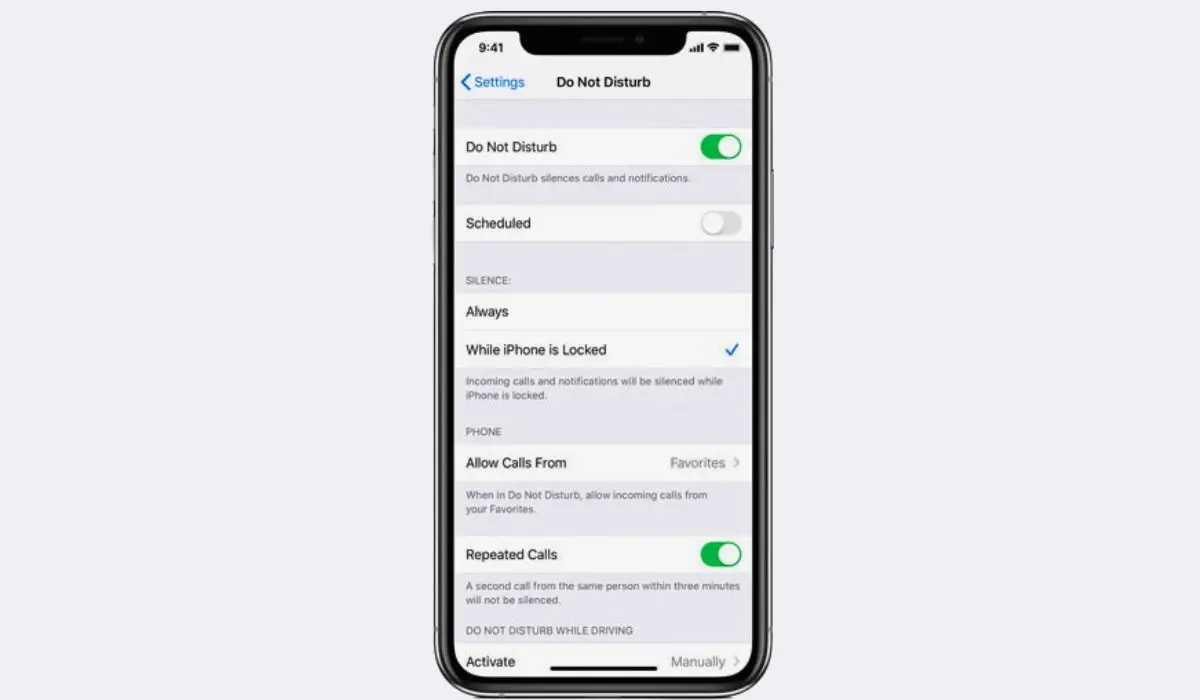
Disable non-urgent desktop alerts, chat badges, and app pings that pull at your attention. Every unexpected notification breaks your train of thought, and regaining full concentration after an interruption can take several minutes.
Category 4: Energy Management Over Time Tracking
Managing your physical and mental energy levels is far more effective than merely managing hours on a clock. When your energy is high, complex work gets done in a fraction of the time.
Here are five key energy-management habits to adopt:
- Match Work to Energy Peaks: Tackle demanding problem-solving when your focus is naturally highest during the day.
- Take True Rest Breaks: Step completely away from screens during breaks to let your vision and mind recharge properly.
- Hydrate Regularly: Keep water near your desk, as light dehydration is a common cause of unexpected fatigue.
- Get Sunlight Early: Step outside shortly after waking up to set your body clock and improve daytime wakefulness.
- Set a Hard Stop Time: Decide on a firm time to log off every evening to allow full recovery before tomorrow.
Category 5: Work Environment & Communication Hacks
Optimizing your immediate physical setup and setting clear expectations with colleagues drastically cuts down on workplace friction.
Here are five practical communication and setup strategies:
- Default to Shorter Meetings: Shift default thirty-minute calendar invites down to concise fifteen-minute check-ins.
- Send Asynchronous Updates: Use brief video recordings or written summaries instead of scheduling extra meetings.
- Declutter Your Physical Workspace: Keep only your daily essentials on your physical desk to keep visual distractions minimal.
- Use Focus Noise Playlists: Use background noise, white noise, or instrumental audio to filter out environmental sound.
- Set Clear Status Messages: Update your team chat status to communicate when you are in deep focus mode.
Why Workflow Efficiency Matters for Modern Teams
True productivity is never about squeezing every single drop of effort out of yourself until you are completely drained. It is about building reliable, clean processes that allow you to complete high-quality work effortlessly while leaving plenty of time to recharge and enjoy life.
When you reduce digital clutter and simplify task management, your workday becomes noticeably calmer and more predictable. Modern platforms like PraviCeler help teams streamline daily tasks, reduce repetitive friction, and ensure projects move forward smoothly without unnecessary overhead.
Conclusion
You do not need to rewrite your entire lifestyle overnight to see massive gains in your daily routines. Real, lasting improvements come from consistent, minor adjustments that build up over time.
Select two or three simple Productivity Hacks from this guide and test them out this week. Whether you decide to start time blocking, batching your email checks, or optimizing your digital tools with PraviCeler, small improvements quickly turn into hours saved. Take charge of your daily schedule, prioritize what matters most, and enjoy the extra time you win back!
Frequently Asked Questions
What is the most effective productivity hack for beginners?
Starting with the 2-Minute Rule is usually the easiest way for beginners to build quick momentum and reduce daily mental stress.
How does time blocking improve focus during the workday?
Time blocking assigns dedicated time slots for specific activities, preventing constant multitasking and helping you maintain deep concentration on one goal.
Can digital tools really save noticeable time every week?
Yes, modern workflow tools like PraviCeler automate repetitive administrative tasks, saving users several hours of manual work every single week.
How do I prevent burnout while trying to boost productivity?
Focus on energy management, take real rest breaks away from screens, and set firm boundaries for when your workday ends daily.